
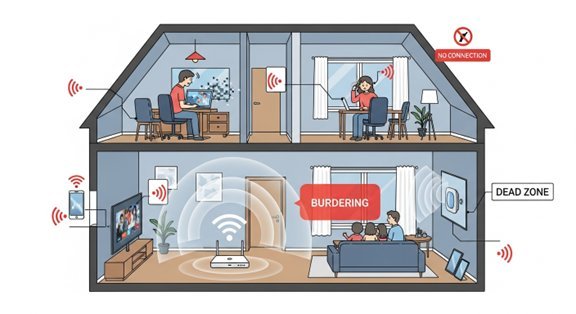
It’s one of modern life’s great mysteries: your WiFi flies in the living room but crawls in the bedroom — or worse, the home office where you actually need it. You pay for 200Mbps, you get 12Mbps in the back bedroom, and the video call freezes at the worst moment. If you’re wondering why your WiFi is so slow in one room of the house, the answer is almost always about physics, not your broadband provider. Here’s what’s going on and how to fix it.
The short answer: your signal is being blocked or stretched too thin
WiFi is just radio waves, and radio waves hate obstacles. Every wall, floor and large object between your router and your device weakens the signal. The 5GHz band — the fast one — is particularly bad at punching through walls, while the slower 2.4GHz band travels further but carries less data. So in a far room, your device might cling to a weak 5GHz signal or drop to congested 2.4GHz, and either way it feels slow. Distance matters too: WiFi speed doesn’t fade gently, it falls off a cliff once the signal gets weak enough that your device keeps retransmitting lost packets.
First, check it’s actually the WiFi
Before rearranging furniture, rule out the obvious. Run a speed test (try Ofcom’s guidance on broadband speeds or any free speed test site) right next to your router, then again in the slow room. If speeds are bad everywhere, the problem is your broadband line or router — call your provider. If it’s only bad in that one room, it’s a coverage problem, and everything below applies. Also test at different times: if the slow room is fine at 7am but awful at 8pm, you might be seeing congestion rather than coverage.
Wifi slow in one room? Start by moving your router
Router placement is the single most overlooked factor. Most routers end up where the engineer left them — in a corner, behind the TV, or in a cupboard. That’s the worst possible spot. WiFi radiates outward and slightly downward, so:
- Put the router as centrally in your home as you reasonably can, not at one end.
- Get it out in the open — not inside a cabinet, behind the sofa, or under a pile of paperwork.
- Raise it up: on a shelf beats on the floor, every time.
- Point the antennas in different directions (one vertical, one horizontal) if they’re adjustable — devices are held at all angles.
I’ve seen this alone double speeds in a problem room. It costs nothing and takes two minutes, so do it first.
Fix 2: hunt down the signal killers
Some household objects are WiFi kryptonite. The worst offenders in a typical UK home:
- Thick stone or brick walls — Victorian terraces and stone cottages are notorious WiFi killers. A single thick wall can halve your signal.
- Metal — mirrors (yes, really — the metallic backing), filing cabinets, radiators, and kitchen appliances.
- Water — fish tanks and even the human body absorb WiFi. A router next to a big aquarium is fighting physics.
- Microwaves and baby monitors — these operate on or near the 2.4GHz band and can cause interference when running.
- Foil-backed insulation — increasingly common in modern renovations, and it turns rooms into Faraday cages.
If your slow room is on the other side of the kitchen from the router, with a fridge, microwave and tiled wall in between, you’ve found your answer.
Fix 3: split your WiFi bands
Many routers broadcast a single network name that merges 2.4GHz and 5GHz, and your device picks whichever it thinks is best — often badly. In your router settings, try giving the 2.4GHz and 5GHz networks separate names (like “Home” and “Home-5G”). Then connect devices in the far room to the 2.4GHz network deliberately. It’ll be slower on paper but far more stable through walls, and stable-slow beats fast-but-freezing for video calls.
Fix 4: change the WiFi channel
In flats and terraced streets, your neighbours’ routers all shout over each other on the same channels. A free analyser app (like WiFi Analyzer on Android) shows which channels are congested. Log into your router (usually 192.168.1.1 or 192.168.0.1 in a browser) and switch to a quieter channel — 1, 6 or 11 on 2.4GHz. It takes five minutes and can genuinely help in dense housing.
Fix 5: extend your coverage properly
If the room is just too far, you need the signal to go further. Your options, from cheapest to best:
- Powerline adapters (£25–£40): These send your internet through your home’s electrical wiring to a second access point in the far room. They’re brilliant in houses with thick walls where WiFi can’t penetrate. Plug one near the router, one in the problem room, done.
- A decent WiFi extender (£20–£35): Cheap and easy, but they halve your speed and can be flaky. Fine for browsing, not great for video calls.
- Mesh WiFi (£80–£200): The proper fix. Two or three units spread around the house create one seamless network. Brands like TP-Link Deco and Amazon eero have made this affordable, and for a typical UK home it’s the closest thing to a guaranteed fix. If you work from home in that back bedroom, this is money well spent.
Fix 6: update and reboot your router
Routers are computers, and they get tired. A reboot once a month clears memory leaks — unplug it for 30 seconds. Also check for firmware updates in the router’s admin page; manufacturers quietly fix performance bugs. And if your router is the ancient freebie your ISP sent in 2018, ask for a newer one — providers will often send an upgraded hub if you complain about coverage, especially if you’re out of contract and thinking of leaving.
When to blame the provider after all
Sometimes it really is them. If your speed at the router is far below what you’re paying for, if it drops out entirely at peak times, or if the problem started suddenly, run the tests and call your ISP with numbers in hand. Under Ofcom rules, if your speed consistently falls below the minimum guaranteed speed in your contract, you have the right to leave penalty-free. Don’t let them fob you off with “reboot your router” for the fifth time — ask for a line test and an engineer visit.
The takeaway
Once the far room is fixed, you may also want to stop your phone battery draining so quickly — weak WiFi makes phones work harder — and our smart TV buffering guide covers the same problem on the big screen.
Nine times out of ten, WiFi that’s slow in one room is a placement or obstacle problem, not a broadband problem. Move the router into the open, check what’s between it and the dead room, and if the walls win, a £30 powerline kit or a mesh system ends the argument. Your video calls will thank you — and so will everyone else in the house who was quietly suffering in that room too.




One comment on “Why Your WiFi Is Slow in One Room (and How to Fix It)”