The worst-case scenario: your phone is gone, and it’s dead or switched off. No ringing it, no live tracking — or so you’d think. Modern phones have a trick up their sleeve that works even with the battery dead. Here’s how to find a lost phone when it’s turned off, what actually works, and what to do if it doesn’t.
The good news: “off” doesn’t mean invisible anymore
iPhones (iPhone 11 and later): Apple’s Find My network is the hero here. Even when your iPhone is powered off or the battery is dead, it continues to emit a low-energy Bluetooth signal for hours (up to 24 hours after shutdown on newer models, longer in Low Power states). Nearby Apple devices — of which there are hundreds of millions — anonymously relay that signal to Apple, updating your phone’s location in the Find My app. It doesn’t need your phone to have power for its radios in the normal sense; a tiny reserve keeps the Bluetooth beacon alive. This genuinely works and has reunited countless people with “dead” phones.
Android (Pixel 8+ and select Samsung): Google’s Find My Device network now offers similar offline finding on supported devices — powered-off phones emit Bluetooth signals relayed by nearby Android devices. It’s newer and less comprehensive than Apple’s (fewer devices in the network, and it needs enabling in Settings > Security > Find My Device > “Allow offline finding”), but it’s improving fast. Samsung’s SmartThings Find has had offline finding for Galaxy devices for a while and works well within Samsung’s ecosystem.
The catch: These features must have been enabled before the phone was lost. Find My iPhone is on by default (leave it that way); Android’s offline finding needs a manual toggle on many phones. Check yours now — it takes ten seconds and it’s the difference between this article saving you and not.
Find lost phone turned off: step-by-step what to do
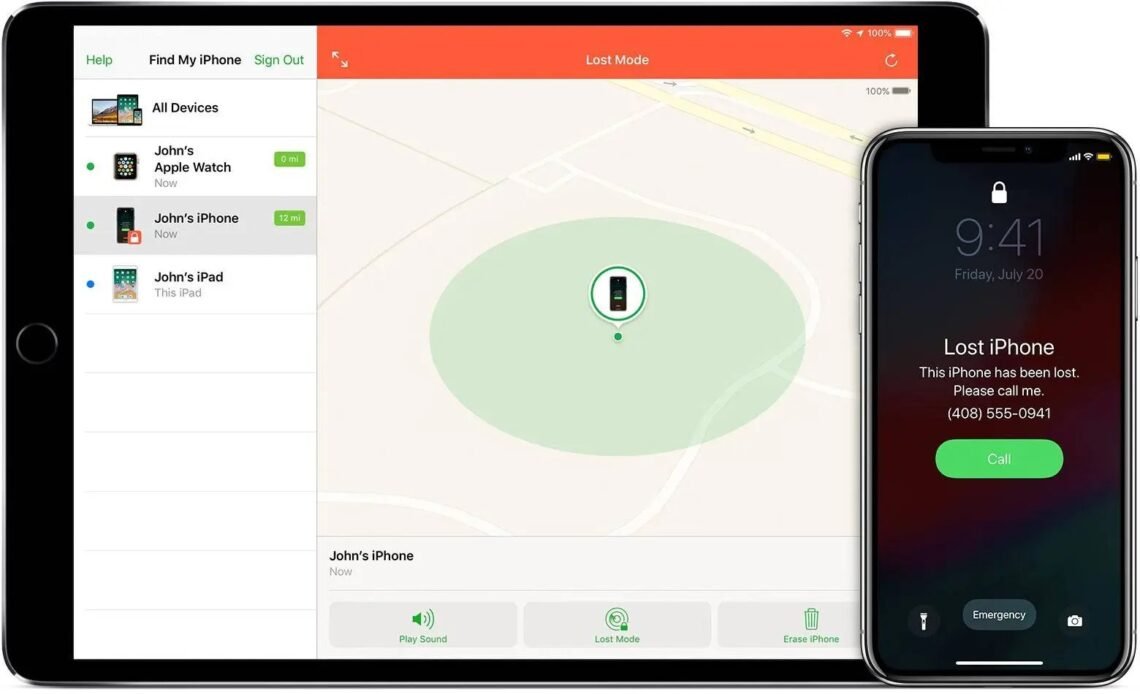
1. Try Find My / Find My Device immediately. On a computer or another device, go to iCloud.com/find (Apple ID login) or android.com/find (Google login). Look for your phone’s location. If it shows a recent location — even hours old — that’s your starting point. The offline networks update whenever any passing device picks up the signal, so a “last seen 20 minutes ago” in a café means it’s probably still there.
2. Mark it as Lost. Both platforms offer Lost Mode (iPhone) / Secure device (Android). This locks the phone with your passcode, displays a custom message with a contact number on the lock screen (“This phone is lost, please call…”), suspends Apple Pay / Google Pay, and emails you when it’s located. Do this immediately — it protects your data and massively increases the chance of an honest finder returning it.
3. Play a sound — just in case. If the location shows your house, use “Play Sound” anyway. “Turned off” sometimes means “screen is black but it’s actually on” — a flat battery, a crash, or the screen failing. The sound has found many phones hiding in sofa cushions that owners swore were dead.
4. Retrace with the timeline. Check your Google Maps Timeline (timeline.google.com) or iPhone Significant Locations — your location history shows where the phone (which was with you) went. That “when did I last have it” question gets much easier with a timeline.
5. Call it anyway. If someone found it and charged it, your call goes through. Leave a voicemail with an alternative contact number.
If the phone is truly unfindable
Protect your accounts first. Change your Google/Apple ID password from another device — this signs the lost phone out of everything remotely. Then work through: banking apps (most let you deauthorise devices), email, social media. With two-factor authentication enabled, a finder can’t get into your accounts anyway — another reason 2FA matters.
Report it. Report to the police (needed for insurance claims — get a crime reference number via 101 or online), inform your network provider (they can blacklist the IMEI, making the phone useless on UK networks even with a new SIM — do this; it also kills the resale value for thieves), and contact your insurer if covered. Many home contents policies and bank-account phone insurance schemes cover theft/loss — check before buying a replacement.
Use the IMEI blacklist. Your network can block the phone’s IMEI across UK networks. A blacklisted phone can’t connect to any UK carrier — it’s effectively a WiFi-only iPod. This doesn’t get your phone back, but it removes the thief’s incentive. Find your IMEI on the original box or your network account (write it down somewhere safe now, while you have your phone).
Don’t pay “finders”. Scams abound: texts claiming “your phone has been found, click here” are phishing. Real finders call the number on your Lost Mode message. Never pay a ransom or click links in unsolicited messages.
The nuclear option: remote erase
If recovery looks hopeless and sensitive data is at stake, use “Erase iPhone” / “Factory reset device” from Find My. This wipes everything remotely the next time the phone connects to the internet. Note: on iPhones, Activation Lock stays on even after erasing — the phone remains useless to a thief. Erasing is irreversible, so treat it as last resort — but don’t hesitate if banking data or sensitive work files are involved. Your cloud backups mean a replacement phone restores everything.
Preventing the next loss
Set this up today, while your phone is in your hand:
- Confirm Find My / Find My Device is on, with offline finding enabled (Android).
- Note your IMEI somewhere safe (dial *#06# to display it).
- Make sure Lost Mode contact info is current.
- Enable 2FA on your Apple/Google account.
- Consider a Bluetooth tracker (AirTag, Tile, Galaxy SmartTag — £25–£35) in your bag or on your keys — they use the same crowd-located networks and find things phones can’t.
- Back up automatically — so a lost phone is an inconvenience, not a catastrophe.
The bottom line
Bookmark Apple’s Find My page now — it’s the page you’ll need in a panic, and every second counts.
A turned-off phone isn’t invisible: Apple’s Find My network (and increasingly Google’s) can locate dead iPhones via Bluetooth beacons relayed by passing devices — but only if it was enabled beforehand. Act fast: locate, lock with a message, protect accounts, blacklist the IMEI. And set up offline finding today — it’s the ten-second toggle that makes this entire article work when you need it.